AMPED PLAYLIST BUILDER
Turn a list of songs - from an email, a text, a spreadsheet - into a playlist from your own music. Songs you have go straight in; songs you don't have get a YouTube search link, and you drop the file in when you've got it.
Click any picture to see it full size.
Quick start
- Open AMPED Playlist Builder. The top shows where your songs come from, for example CRASH-OVERRIDE · 16,103 songs · CO library (your PC's name, then the songs it found).
- Paste the song list into the big box - one song per line - and press FIND SONGS (or Ctrl+Enter). Or press LOAD A LIST... for a spreadsheet.
- Songs you have fill the PLAYLIST on the left. Songs you don't have are cards under MISSING on the right.
- Check the amber ones, get the missing ones, then type a name and press SAVE PLAYLIST.
Nothing in your music folders is changed, moved or deleted. No account, no ads, nothing sent anywhere.
Your list
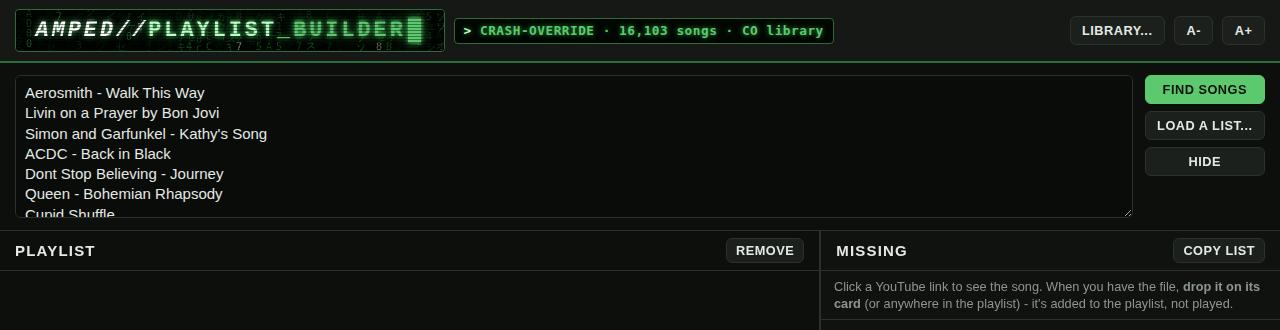
One song per line, in any of these ways - it works out which part is the artist:
| Artist - Song | Aerosmith - Walk This Way |
| Song - Artist | Dont Stop Believing - Journey (the wrong way round is fine) |
| Song by Artist | Livin on a Prayer by Bon Jovi |
| Just the song | Cupid Shuffle |
| Numbered lists | "1. ", "01 - ", "12) " at the start of a line are left out |
LOAD A LIST... (or drop the file on the window) reads:
- Spreadsheets - .xlsx, .xls, .ods, .csv. Columns headed Song / Title and Artist are used; without headings the first two columns are used, either way round.
- Text files (.txt) - one song per line, like the box.
- Playlists (.m3u / .m3u8) - the song names in them.
If there's already a list on the screen, it asks: ADD TO THIS LIST or START A NEW LIST. HIDE folds the box away; ADD SONGS brings it back.
The screen
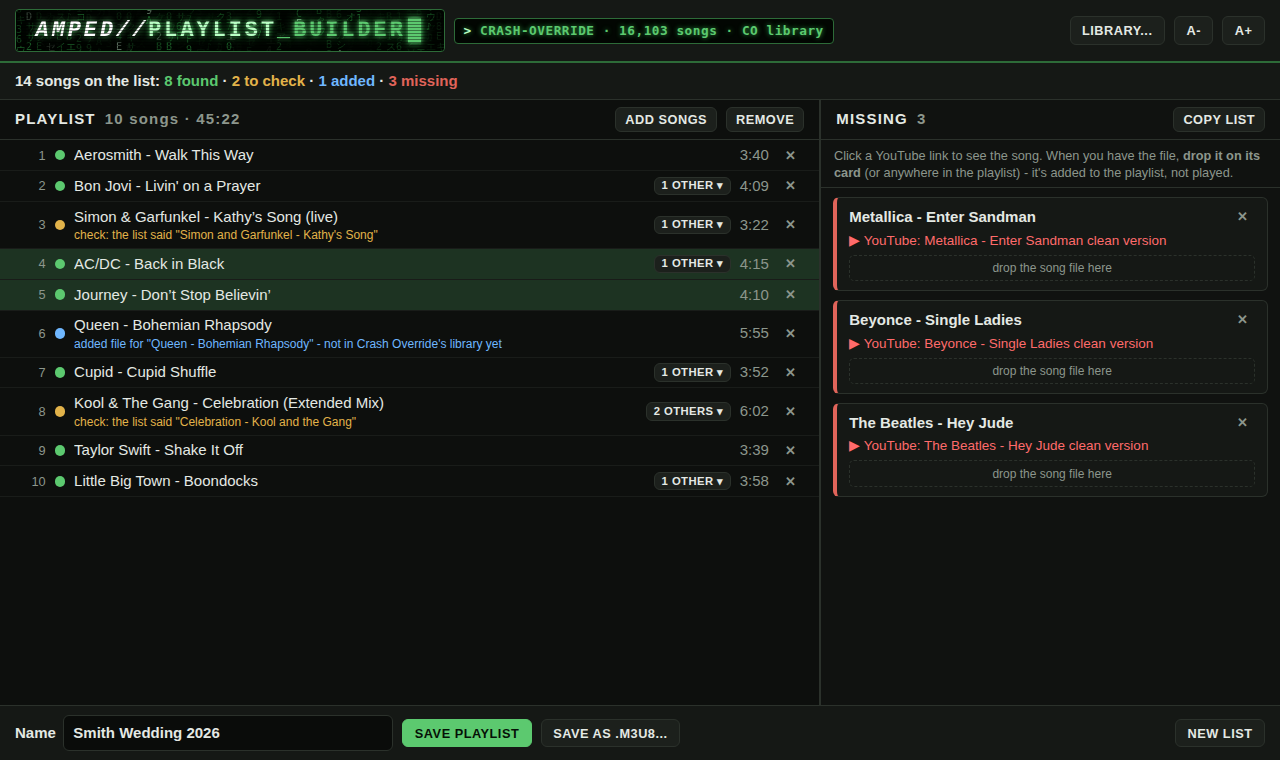
- Library - your PC's name, how many songs, and where they come from (CO library or music folder). LIBRARY... changes it.
- Summary - how many songs were on the list: found, to check, added by you, missing.
- PLAYLIST - the songs, in your list's order, with the total time. Green dot = found, amber = check it, blue = a file you added.
- OTHERS - other versions of that song in your library (see Checking the matches).
- MISSING - one card per song you don't have.
- Name and SAVE - see Saving. NEW LIST clears the screen (saved playlists are kept).
A- / A+ make the text smaller or bigger. Close the app any time - the list, the playlist and the name are still there next time.
Checking the matches
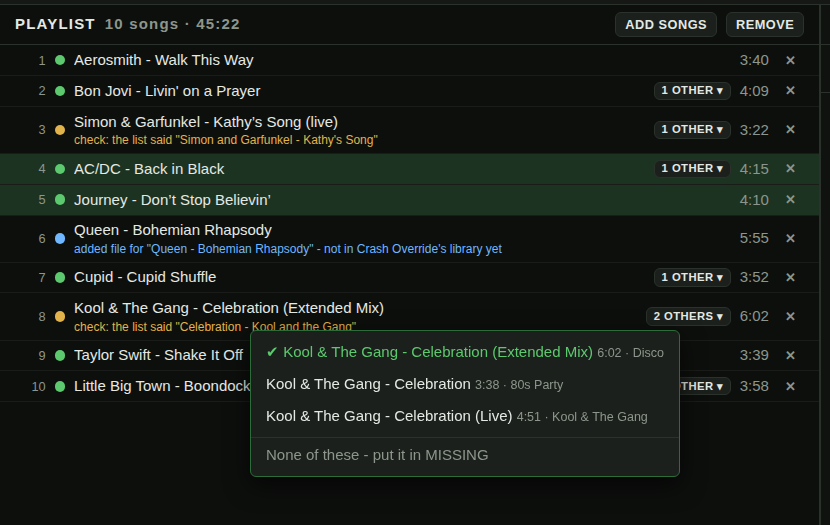
A green song is a sure match. An amber one is probably right but worth a look - under it you see what your list asked for (for example the list said "Celebration" and it picked the Extended Mix).
Click OTHERS (or right-click the song › Pick a different version...) to see every version in your library with its length and folder. Pick one and it turns green. None of these - put it in MISSING moves the song to the missing cards.
Missing songs
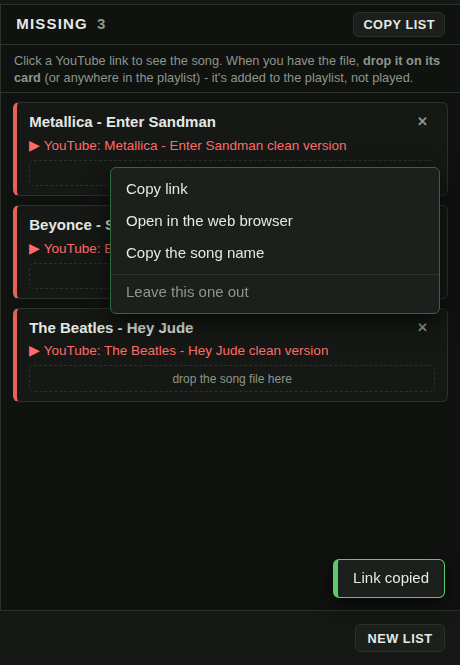
Each card shows the line from your list and a red YouTube link that searches for it with clean version on the end - click it and YouTube opens in your web browser, so you can hear what the song is.
Right-click a card for Copy link, Open in the web browser, Copy the song name or Leave this one out (the × on the card does the same). COPY LIST copies every missing song as text - handy to send to someone or to shop for them.
Adding files you got
When you have a song file, drag it from Explorer onto the app:
- Onto its missing card - it goes into the playlist at that song's place in your list. The card goes away.
- Into the playlist - it goes where you drop it (a green line shows the spot), and the app works out which missing card it was for.
- A folder - all the songs in it are added.
Dropping a file only adds it to the playlist - nothing plays. Added files have a blue dot and say they're not in Crash Override's library yet.
Editing the playlist
| Click | highlights a song |
| Shift + click | highlights the two songs and everything between |
| Ctrl + click | adds or removes one song from the highlight |
| Drag | moves the highlighted songs (all of them together) - a green line shows where they land |
| Delete / × / REMOVE | takes the highlighted songs out of the playlist |
| Double-click | shows the song's file in Explorer |
| Right-click | Pick a different version... / Show the file in Explorer / Remove from the playlist |
Saving

Type a name (the box also suggests your saved playlists) and press SAVE PLAYLIST:
- With Crash Override on the PC, it's saved with Crash Override's playlists, so it opens in Crash Override, in AMPED and AMPED MAX (Playlists in the library) and on the phone in AMPED Mobile (LISTS › FROM the PC).
- Without Crash Override, it's saved as an .m3u8 file in a Playlists folder inside your music folder.
- If the name is taken it asks before replacing it. If songs are still missing it asks first - you can add them and save again later.
SAVE AS .M3U8... saves a playlist file anywhere you choose - for other music players, or a USB stick.
Where the songs come from

| Use Crash Override's library | the songs Crash Override knows (fast, with its tags). Shows when Crash Override is on this PC. |
| Use a music folder... | pick the folder that holds your music; every song in it (and in the folders inside it) is read. The first time can take a few minutes - the top counts the songs as they're read. After that only new or changed songs are read again. |
| Read the library again | after you add music (or after a RESCAN in Crash Override). |
On a PC without Crash Override it asks for your music folder the first time.
How songs are matched
- Capitals and punctuation don't matter (ACDC finds AC/DC, Dont finds Don't) - the same rules as searching in Crash Override.
- Small spelling slips are forgiven: a word of 4+ letters may be 1 letter off (2 for long words) - Arosmith finds Aerosmith.
- The, and and & don't count in band names; (feat. ...), [Clean], (Radio Edit) don't have to be in your songs.
- Songs tagged "Various Artists" are found by the band's name in the file name.
- Your music is only read - tags and files are never changed.
Keys
| Ctrl + Enter | FIND SONGS (in the list box) |
| Ctrl + A | highlight every song in the playlist |
| Delete | remove the highlighted songs |
| Esc | closes a menu |
Test code & updates
AMPED Playlist Builder is in a closed test. The first time it opens it asks for your test code (it starts with CODJ-) - paste the code from your invitation email and press UNLOCK. It works without the internet; your list and playlists are never lost while it waits for a code. Test copies tell the developer how often and how long they're used (code number, app version, minutes) - no music, lists or personal details.
It checks crashoverridedj.com for a newer version 20 seconds after it opens and every 6 hours. When there is one, a box offers UPDATE NOW: it installs and opens again by itself, with your list and playlists kept. LIBRARY... › Check for updates checks right away. Updates are only accepted if they're signed by the maker. The same menu has the User manual and Send an idea... (straight to the maker).
Troubleshooting
| A song I have says missing | Is it in the library? New files need a RESCAN in Crash Override (or LIBRARY... › Read the library again). Check the spelling on the line - very different spellings or nicknames aren't matched. |
| It picked the wrong version | OTHERS (or right-click › Pick a different version...). |
| "Crash Override isn't on this PC" | Pick your music folder (LIBRARY... › Use a music folder...). |
| A spreadsheet reads wrong | Give the columns the headings Song and Artist, or save it as .csv and try again. |
| Where it keeps its own data | %APPDATA%\com.crashoverride.playlistbuilder (the music-folder list). Your work in progress is kept by the app itself. |
Pictures show example song lists.