AMPED BOOKS
The audiobook player for your PC - your own audiobook folders, your place in every book, chapters, speed, sleep timer and bookmarks.
Click any picture to see it full size. Numbers on the pictures match the numbered lists next to them.
Quick start
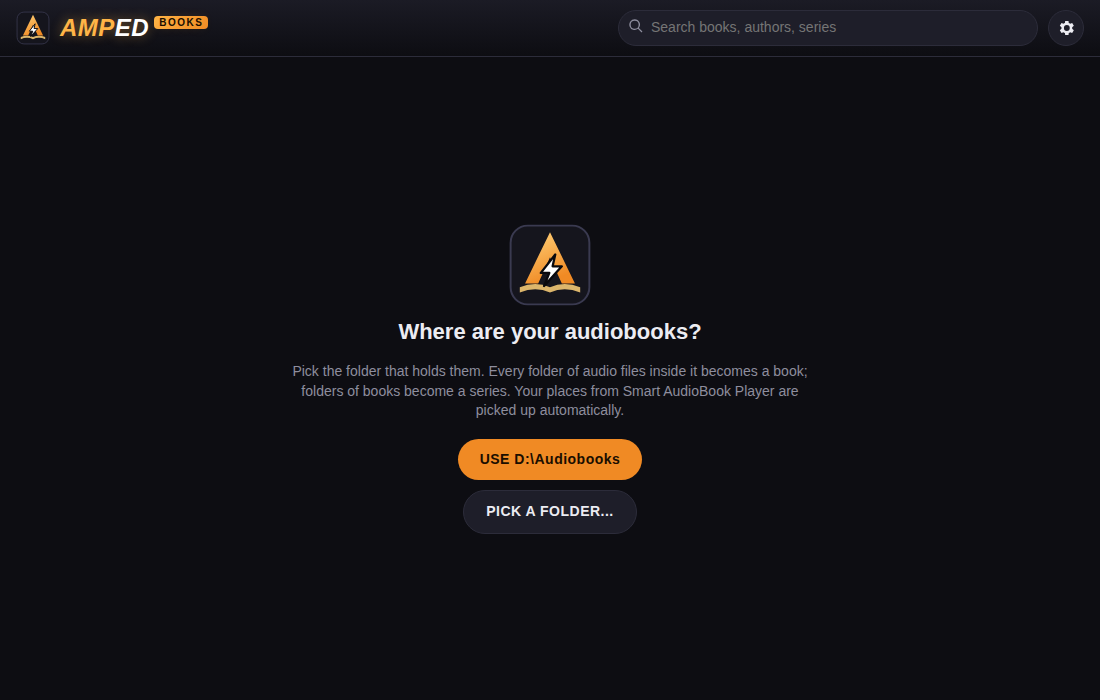
- Open AMPED Books. It asks where your audiobooks are: click USE D:\Audiobooks (if it found one) or PICK A FOLDER....
- It looks through the folder - a bar shows how far it is. Every folder of audio files becomes a book, with its cover.
- If you used Smart AudioBook Player, your place in every book is picked up: the book, the spot, the speed, and which ones you finished.
- Click a book, then PLAY (or CONTINUE). That's it - it remembers your place from then on.
Nothing is copied or changed in your audiobook folders. No account, no ads, nothing sent to the cloud.
The library
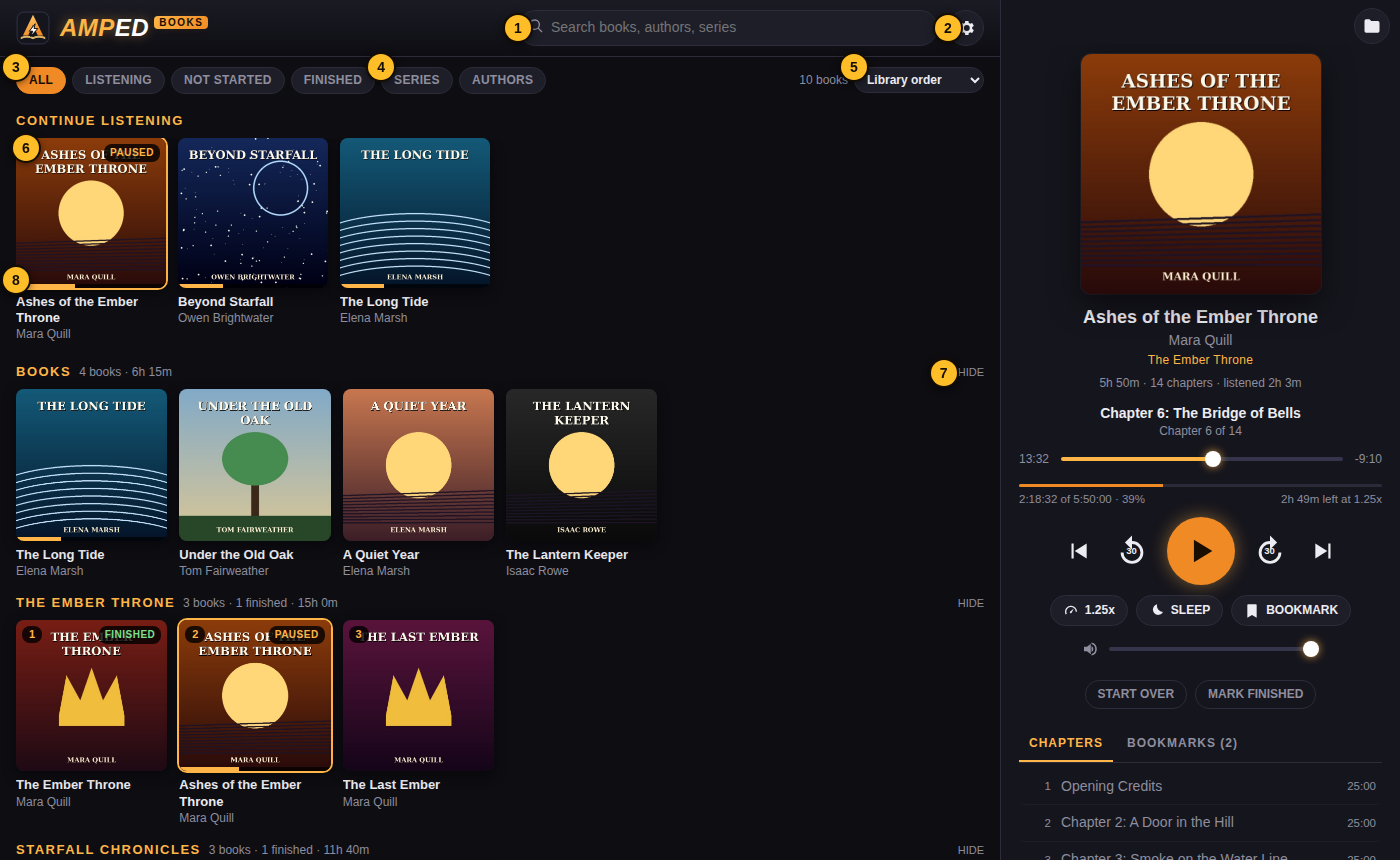
- Search - titles, authors and series as you type. Ctrl+F jumps here, Esc clears it.
- Settings - library folders, button jumps, smart rewind, Smart AudioBook Player, keys, manual, updates, SEND AN IDEA.
- ALL / LISTENING / NOT STARTED / FINISHED - which books show.
- SERIES / AUTHORS - the books grouped by series or by author (see Series & authors).
- Sort - Library order (your folders' order), Title, Author, Recently played, Longest.
- Continue listening - the books you're part-way through, the latest first. PLAYING / PAUSED marks the one in the player.
- HIDE / SHOW - folds a shelf away (remembered). Each shelf says how many books, how many finished, and the total time.
- Progress bar - how far through the book you are. Finished books say FINISHED.
Below the books without a series come the series shelves, with the books numbered in order.
The player
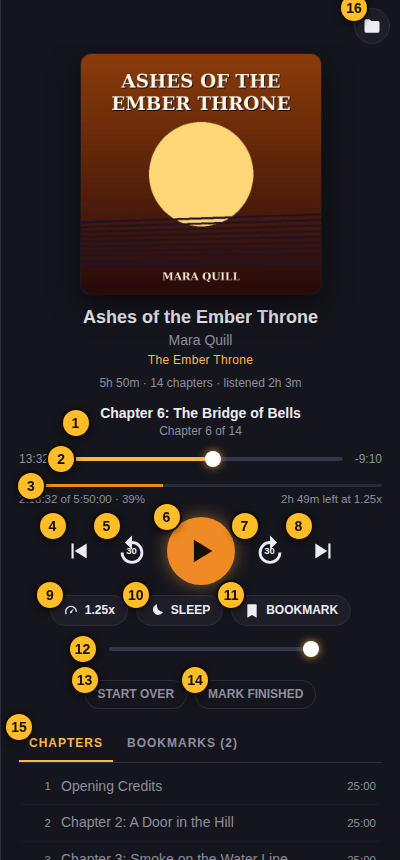
- Chapter - the chapter you're in, and which one of how many.
- Chapter bar - drag to move inside the chapter. Left: time into the chapter; right: time left in it (at your speed).
- Book bar - where you are in the whole book, the %, and the time left in the book at your speed.
- Previous chapter - back to the start of this chapter; press again (within 3 seconds) for the one before.
- Back - jumps back 30 seconds (Settings changes it: 5-60 s).
- Play / pause - Space. After a pause it goes back a few seconds first (smart rewind - see Settings).
- Forward - jumps forward 30 seconds (Settings: 5-60 s).
- Next chapter - the start of the next chapter.
- Speed - 0.5x to 3x (see Speed).
- Sleep timer - stops the book for you (see Sleep timer).
- Bookmark - keeps this spot, with a note (see Bookmarks).
- Volume - AMPED Books' own volume.
- START OVER - back to the beginning (bookmarks are kept).
- MARK FINISHED - marks the book done (or not done).
- CHAPTERS / BOOKMARKS - click a chapter or a bookmark to go there. Chapters you've passed are dimmed.
- Folder - opens the book's folder in Explorer, on the file playing.
Your place is saved every few seconds, when you pause, and when you close the app - reopen it and the same book is ready at the same spot. Media keys on the keyboard (and the Windows volume pop-up's play button) work too.
Looking at another book
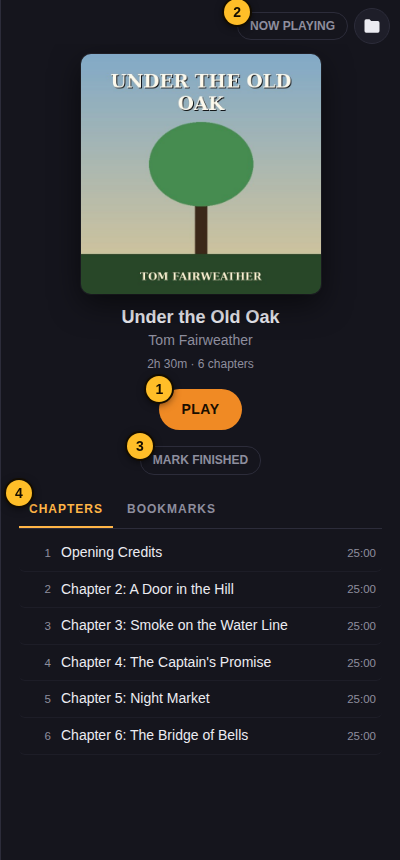
- PLAY - starts this book (CONTINUE if you've started it - with the time left; LISTEN AGAIN if you finished it). The book that was playing keeps its place.
- NOW PLAYING - back to the book that's playing - clicking around the library never stops it.
- MARK FINISHED - without playing it.
- CHAPTERS - click one to start the book right there.
Series & authors
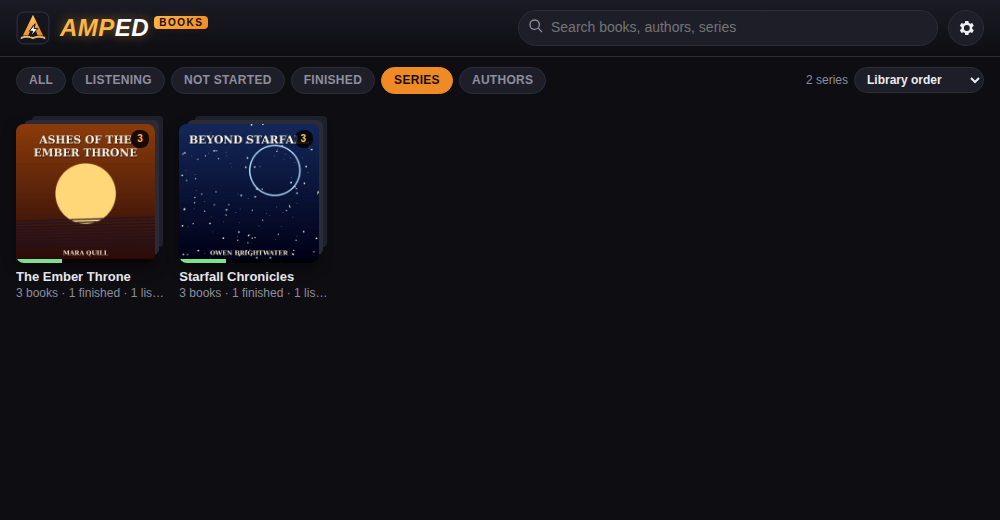
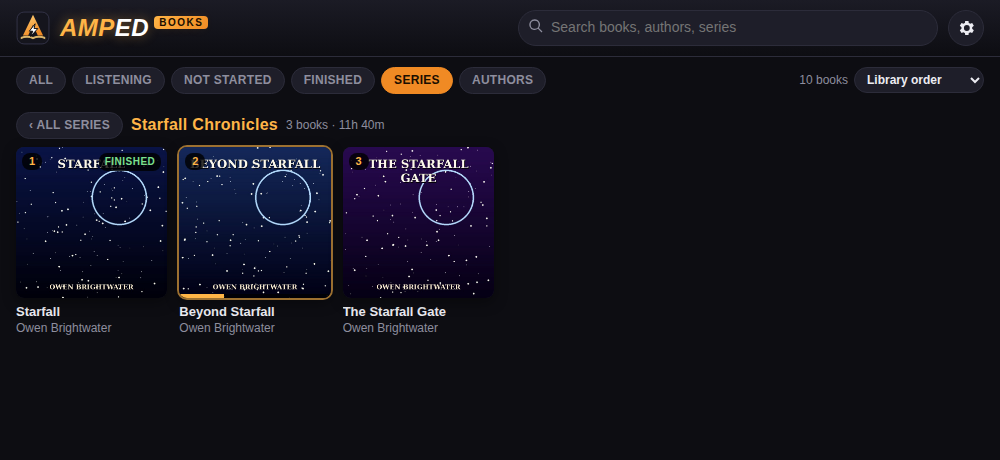
SERIES shows one stack per series, with how many books, how many you finished and how many you're listening to. Click one to see its books in order, numbered; ‹ ALL SERIES goes back. AUTHORS does the same by author (a book with two authors shows under both). The sort menu sorts the series or authors by name, by the one you played last, or by the most books.
Speed
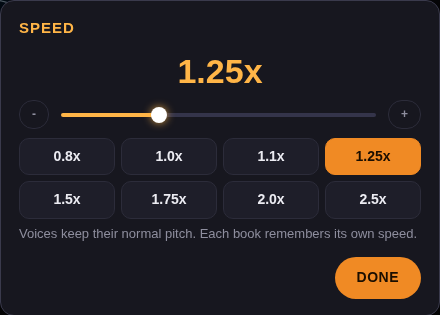
Drag the bar or click a speed. - and + go in small steps (0.05x); [ and ] do the same from the keyboard. Voices keep their normal pitch.
Every book remembers its own speed. The time left (in the player and on CONTINUE) is worked out at your speed.
Sleep timer
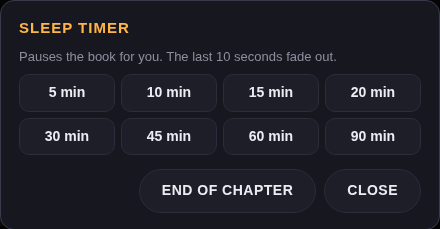
Pick the minutes, or END OF CHAPTER. The book starts playing if it wasn't, and the button shows the time left. The last 10 seconds fade out, then it pauses - and your place is saved.
While a timer runs: +5 MIN adds five minutes, TURN OFF stops it.
Bookmarks
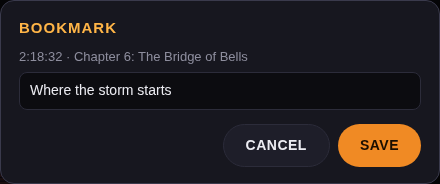
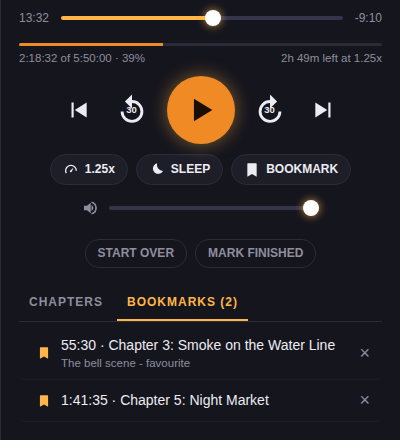
Press BOOKMARK (or B), type a note if you like, SAVE (or Enter). The BOOKMARKS tab lists them in book order with the time and chapter - click one to go there, × deletes it. START OVER keeps them.
Coming from Smart AudioBook Player
Smart AudioBook Player keeps a small file called position.sabp.dat in each book's folder. When AMPED Books finds a book for the first time it reads that file and takes over: the file you were on, the spot, your speed, and whether you finished the book. Books on discs (Disc 1, Disc 2...) take the place from the disc you played last.
- Once you've listened to a book in AMPED Books, its own place counts - it's never overwritten.
- Settings › SMART AUDIOBOOK PLAYER › PICK THEM UP AGAIN reads the files again (for books you haven't played here), e.g. after more listening on the phone.
- The position files are only read, never changed.
How books are found
| A folder with audio files | one book. Its files play in number order (2 before 10). MP3, M4B, M4A, AAC, OGG, OPUS, FLAC, WAV, WMA. |
| Disc folders | "Disc 1"..."Disc 6" inside a book folder, or sibling folders named "Title (Disc 1)", "Title (Disc 2)"... are joined into one book. |
| A folder of book folders | a series (when it holds two or more books). |
| Chapters | from inside the file (M4B / M4A chapters, MP3 chapters), else from a .cue file next to it, else one chapter per file. One long file without chapters gets 30-minute sections so you can still jump around. |
| Title & author | from the files' tags; if they have none, from the folder name ("Author - Title", "Title by Author"). Numbers, sizes and run times in folder names ("1990a - ", "64k", "{889mb}") are left out. |
| Cover | cover.jpg / folder.jpg (or the biggest picture in the folder), else the picture inside the audio file. |
| Second copies | if every file is there twice ("Part 01.mp3" and "Part 01 - copy.mp3"), the bigger copy is used - the book says how many were left out. |
| Left out | hidden folders, Mac leftovers (__MACOSX, ._ files) and folders with a .nomedia file. |
New and changed books are picked up every time AMPED Books starts, and with Settings › LOOK FOR NEW BOOKS. Only new or changed files are read again, so it's quick. If a library folder is on a drive that isn't plugged in, its books stay in the list (they play again once it's back).
Settings
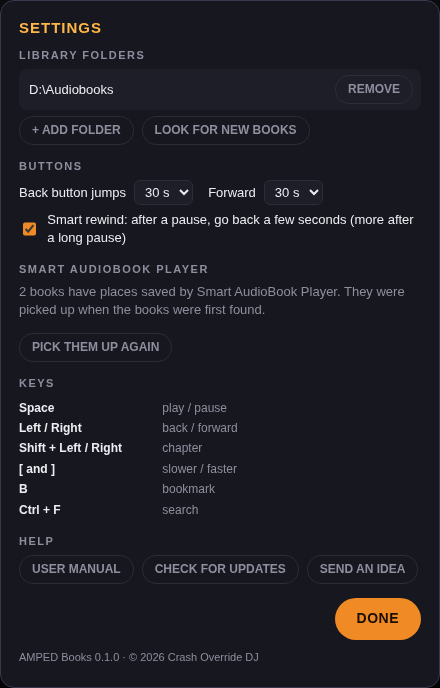
| LIBRARY FOLDERS | the folders AMPED Books looks in. + ADD FOLDER, REMOVE, LOOK FOR NEW BOOKS. |
| Back / Forward | how far the back and forward buttons jump (5-60 s). |
| Smart rewind | after a pause the book goes back a little so you catch the thread: 4 s after a minute, 10 s after 5 minutes, 20 s after an hour. |
| SMART AUDIOBOOK PLAYER | PICK THEM UP AGAIN (see Coming from Smart AudioBook Player). |
| KEYS | the keyboard keys. |
| HELP | USER MANUAL (this), CHECK FOR UPDATES, SEND AN IDEA (goes straight to the maker). |
Keys
| Space | play / pause |
| ← / → | back / forward |
| Shift + ← / → | previous / next chapter |
| [ / ] | slower / faster |
| B | bookmark |
| Ctrl + F | search |
| Esc | closes a box; in a narrow window, back to the library |
| Media keys | play / pause, previous / next chapter (also a key set to Play/Pause in PowerToys) |
Narrow window
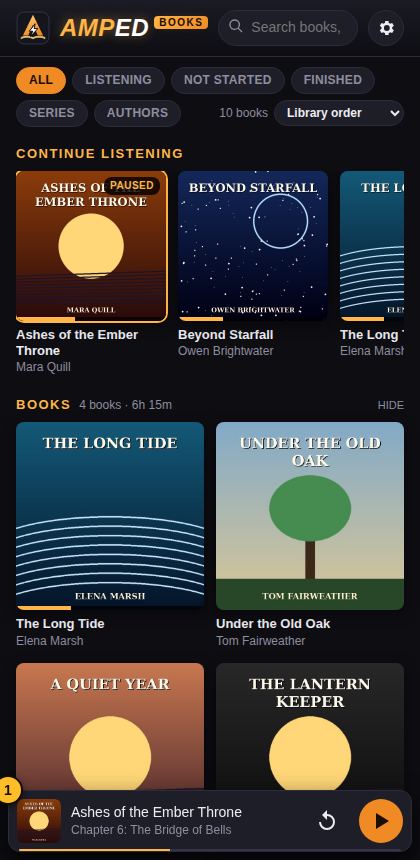
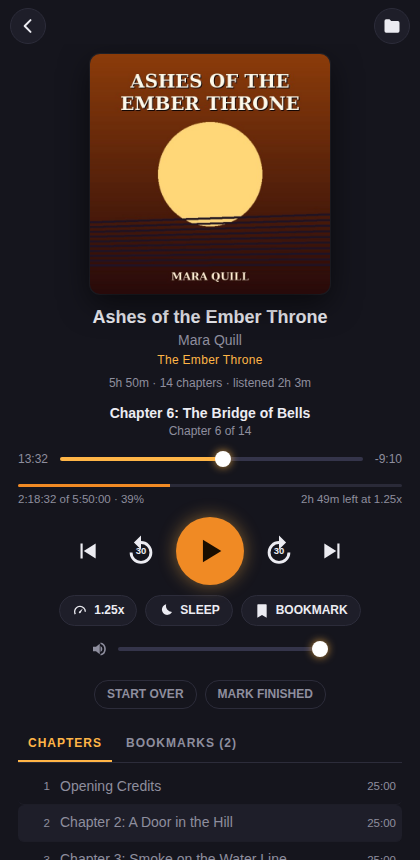
Make the window narrow (beside other windows, or on a small screen) and the library fills it, with a small player bar at the bottom (1): the back button and play / pause work right there; click the bar for the full player, and the arrow at its top-left goes back to the library.
Updates
AMPED Books checks crashoverridedj.com for a newer version (a few seconds after it starts, then every few hours). When there is one, a box offers UPDATE NOW: your place is saved, the update installs, and AMPED Books opens again by itself. Your books, places, bookmarks and settings are kept. Settings › CHECK FOR UPDATES checks right away. Updates are only accepted if they're signed by the maker.
Troubleshooting
| A book is missing | Is its folder inside a library folder? Settings › LOOK FOR NEW BOOKS. Folders with a .nomedia file are left out. |
| "Couldn't open ... is the drive plugged in?" | The book's drive or folder isn't there right now (a USB drive, or the files were moved). |
| Wrong title or author | AMPED Books uses the files' tags first. Fix the tags (or the folder name) and press LOOK FOR NEW BOOKS. |
| Two books that should be one | Disc folders join when they're named Disc 1, Disc 2... (or "Title (Disc 1)"). Other splits can be fixed by putting the files in one folder. |
| The time left looks odd | Some MP3s don't say their length exactly; AMPED Books corrects it the first time each file plays. |
| Where AMPED Books keeps its own data | %APPDATA%\com.amped.books - your places, bookmarks and library list (your audiobooks are never changed). |
Pictures show invented example books.